

How to Navigate the Online Health Consultation Process

The online health consultation process is defined as a structured series of steps patients take to prepare for, participate in, and follow up on medical appointments conducted through video, phone, or secure digital platforms. Telehealth has moved from a convenience to a standard care channel, and knowing how to navigate it well determines whether you leave the call with a clear plan or a frustrating half-answer. This guide walks you through every phase of a virtual visit, from device setup and informed consent to post-visit documentation, so you get the most from every appointment.
How to navigate the online health consultation process
Before you can have a productive virtual visit, you need to understand what the process actually involves. A telehealth appointment follows the same clinical logic as an in-person visit: a provider gathers your history, assesses your symptoms, and recommends a care path. The difference is that every piece of information must travel through a screen. That constraint rewards patients who prepare and penalizes those who wing it.
The core steps are: prepare your technology and environment, gather your medical information, complete pre-visit paperwork, attend the appointment with clear communication goals, and follow up on any care instructions. Each step has specific actions that separate a productive virtual visit from a wasted one.

What equipment and preparation do you need before a virtual visit?
Technology is the foundation of any telehealth appointment, and a weak foundation collapses the whole visit. Scripps Health recommends testing your device camera and microphone, confirming a strong internet connection, charging your device fully, and verifying your insurance coverage before the appointment starts. These four steps take under ten minutes and prevent the most common technical failures.
Your device options are a smartphone, tablet, or computer with a working camera and microphone. A wired internet connection is more reliable than Wi-Fi for video calls, but if Wi-Fi is your only option, sit as close to the router as possible. Find a private, well-lit space where your face is clearly visible and background noise is minimal. Natural light facing you works better than a window behind you, which creates a silhouette.
Gather your medical information before the call, not during it. Bring a list of questions and prepare detailed medical history including your current medications, symptom timeline, and any relevant past conditions. Providers make safer assessments when they have organized information rather than piecing together a scattered account in real time.
Pro Tip: Log in early to test your video and audio before the provider joins. Most telehealth platforms offer in-app support that responds faster before the session begins, so early entry gives you a real troubleshooting window.
Accessibility needs require advance planning too. Under the Americans with Disabilities Act, providers must accommodate patients by offering sign language interpreters, captioning, and extra appointment time at no additional charge. If you need any of these accommodations, contact the clinic before your scheduled visit so they can arrange the right setup.
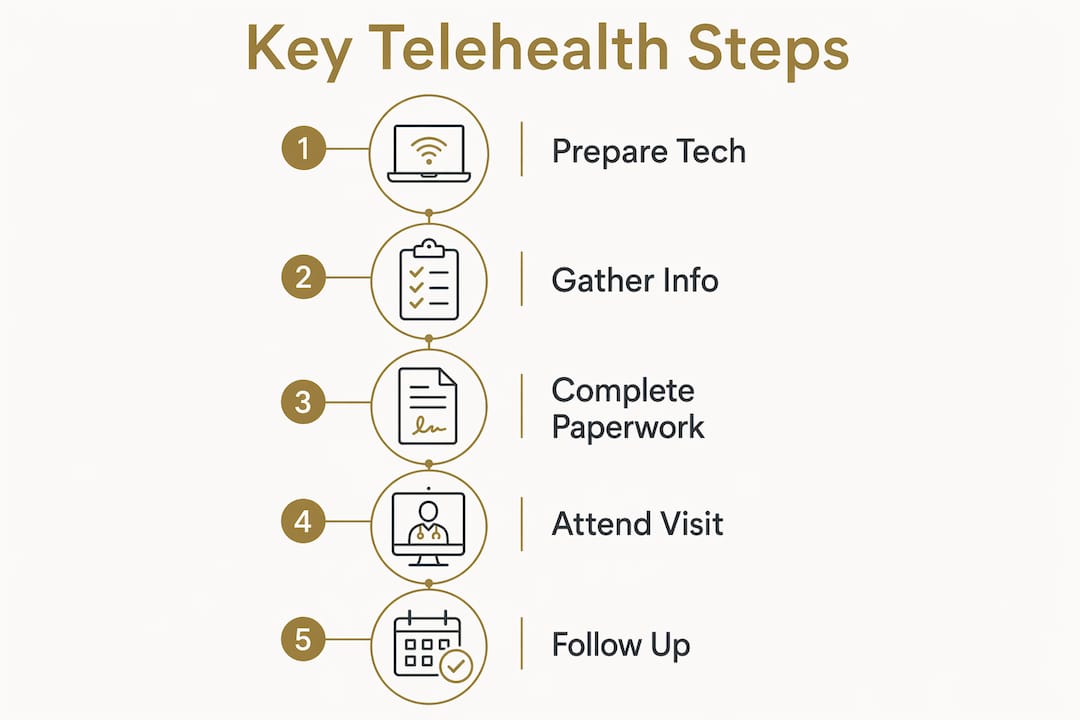
What are the typical steps during an online health consultation?
The appointment itself follows a predictable sequence, and knowing that sequence lets you participate more confidently rather than reacting to each prompt.
-
Log in 5 to 10 minutes early. Confirm your camera and microphone are working, and grant any browser permissions the platform requests. Entering the virtual waiting room early means any technical issue gets resolved before the provider is waiting on you.
-
Complete informed consent. Electronic telehealth consent must cover the platform’s limitations, privacy risks, emergency procedures, and identity verification. This is a legal requirement, and it must be stored in your medical record. Read it rather than clicking through it. The limitations section tells you exactly what the provider can and cannot do for you remotely.
-
Present your symptoms clearly and in order. Organizing your top three goals and a symptom timeline before the call reduces in-call clarifying questions and helps the clinician focus their assessment. Lead with your primary concern, then add context. “I’ve had a sharp pain in my lower right back for five days, it worsens when I sit, and I rate it a six out of ten” is far more useful than “my back has been bothering me.”
-
Respond to provider requests. Your provider may ask you to show an affected area on camera, press on a specific spot, or move a limb. Do this in good lighting and hold the camera steady. If something is unclear, ask for clarification before attempting it.
-
Ask your questions before the call ends. Keep your written list visible. Providers appreciate patients who ask specific questions because it confirms understanding and reduces follow-up calls.
-
Understand escalation. If your provider determines that your condition requires a physical exam, imaging, or lab work, they will direct you to in-person care. This is not a failure of telehealth. It is the system working correctly.
Pro Tip: You have the right to know how your session is encrypted and who can access any recording. Under HIPAA, platform privacy measures must be disclosed to you. Ask your provider directly if the consent form does not address it.
How do you handle post-consultation steps effectively?
The appointment ends, but your care does not. What you do in the 24 hours after a virtual visit determines whether the consultation actually improves your health.
-
Request a written care plan. Scripps recommends asking for a written or digital visit summary so you can follow instructions accurately and understand your next steps. Verbal instructions during a video call are easy to misremember.
-
Schedule follow-up appointments. If your provider recommends a follow-up in two weeks, book it before you close the platform. Leaving it to “later” means it often does not happen.
-
Monitor your symptoms with a log. Write down changes daily, including dates and severity ratings. This record becomes your evidence base if your condition worsens or you need to see a different provider.
-
Know when to go in person. Telehealth is not a substitute for emergency care. If symptoms escalate to chest pain, difficulty breathing, sudden neurological changes, or severe injury, call 911 or go to an emergency room immediately.
-
Access your medical records. Under federal law, you have the right to request a copy of your telehealth visit notes. Most platforms provide a patient portal where records are available within days. Store any downloaded documents in an encrypted folder or a password-protected cloud service.
Understanding your telehealth patient rights also means knowing that you can request corrections to your records and file a complaint if your privacy was not protected during the visit.
What common challenges come up and how do you solve them?
Even well-prepared patients hit obstacles. Knowing the most common ones in advance means you spend seconds solving them instead of minutes panicking.
Technical failures are the most frequent disruption. If your video drops, switch to audio-only immediately and notify your provider via the platform’s chat function. If the connection fails entirely, most clinics will call you on the phone number in your file. Telehealth platforms typically have a support line accessible from the login page.
Incomplete symptom descriptions are the second most common problem, and they are entirely preventable. Patients who describe symptoms vaguely force providers to ask multiple clarifying questions, which eats into appointment time and can lead to incomplete assessments. Write your symptom timeline before the call.
Prescription restrictions catch many patients off guard. Certain controlled substances cannot be prescribed via telehealth under federal law, and some states have additional restrictions. Ask your provider before the appointment if you expect a specific prescription, so you are not surprised.
Telehealth should not be used for emergencies. Patients with urgent or emergency conditions must seek immediate in-person care, since remote consultations rely on history and observation and lack full emergency capabilities.
Accessibility barriers are underreported but significant. Telehealth is not automatically accessible. Providers must actively ensure their platforms support assistive technologies and communication accommodations. If a platform does not work with your screen reader or captioning software, report it to the clinic and request an alternative format.
Key takeaways
Successfully navigating the online health consultation process requires preparation before the call, clear communication during it, and deliberate follow-up after it.
| Point | Details |
|---|---|
| Prepare technology first | Test your camera, microphone, and internet connection at least ten minutes before the appointment. |
| Organize medical information | Bring a symptom timeline, medication list, and your top three questions to every virtual visit. |
| Understand informed consent | Read the telehealth consent form carefully. It defines what your provider can and cannot do remotely. |
| Follow up in writing | Request a written care plan after every visit to avoid misremembering verbal instructions. |
| Know telehealth’s limits | Emergencies require in-person care. Telehealth handles assessment, monitoring, and non-emergency prescriptions. |
What I have learned from watching patients navigate telehealth
Most people assume that struggling with telehealth means they are not tech-savvy enough. That is the wrong diagnosis. The patients who get the most from virtual visits are not the ones with the best equipment. They are the ones who treat the appointment like a prepared meeting rather than a casual phone call.
I have seen patients with older smartphones and basic Wi-Fi get better clinical outcomes than patients with high-end setups, simply because they wrote down their symptoms, brought their medication bottles into frame when asked, and asked one specific question at the end of the call. Preparation is the actual skill here, not technology fluency.
The consent process is where I think most patients leave value on the table. Clicking through a consent form without reading it means you do not know what your provider cannot do for you, what happens to your session data, or how to escalate if something goes wrong. That information changes how you use the visit. The telehealth consent details at Revive-meds are written to be read, not just signed.
One more thing worth saying directly: telehealth has real limits, and a good provider will tell you when you have hit them. If your provider escalates you to in-person care, that is clinical judgment working in your favor. The goal of a virtual visit is not to avoid a physical one. It is to get the right care efficiently.
— Amy
How Revive-meds supports your telehealth experience
Revive-meds is built around the idea that good care should not require a waiting room or a membership fee. Every appointment starts with a clinician-reviewed plan, and every patient gets unlimited provider messaging so questions do not pile up between visits. If you are preparing for your first virtual appointment or want to understand what a well-run telehealth visit looks like, the first telehealth appointment guide on Revive-meds walks through tech setup, symptom sharing, and insurance verification in plain language. For patients who want to understand the consent and privacy framework before they book, the medical consent page covers every detail. Care ships to your door in 48 to 72 hours, with HSA/FSA eligibility and no surprise fees.
FAQ
What do I need for an online health consultation?
You need a camera and microphone-enabled device, a stable internet connection, a private space, and your medical information including medications and symptom history. Verifying your insurance coverage before the appointment prevents billing surprises.
How early should I log in to a telehealth appointment?
Log in five to ten minutes before your scheduled time to test your video and audio. Entering the virtual waiting room early gives you a troubleshooting window before your provider joins.
Can all conditions be treated via telehealth?
No. Telehealth works well for non-emergency assessments, follow-ups, and prescription management, but conditions requiring a physical exam, imaging, or emergency intervention require in-person care.
What are my privacy rights during a telehealth visit?
Under HIPAA, you have the right to know how your session is encrypted, who can access any recording, and what the platform’s data controls are. Your provider must disclose these details, typically in the consent form.
What should I do if my telehealth connection drops mid-appointment?
Switch to audio-only immediately and use the platform’s chat to notify your provider. If the connection fails entirely, most clinics will contact you at the phone number on file to continue or reschedule the visit.