

How to Message Your Telehealth Provider Effectively

Effective telehealth messaging is the practice of communicating clearly, securely, and with enough clinical detail that your provider can act without unnecessary back-and-forth. Most patients treat telehealth like texting a friend, which is exactly why only 38.8% to 49.8% of patients report optimal patient-centered communication during telehealth visits. That gap is not a technology problem. It is a communication skills problem, and it is entirely fixable. This guide gives you the specific techniques, structures, and security requirements to message telehealth provider effectively and get faster, more personalized responses every time.
How to message a telehealth provider effectively: what you need first
Before you type a single word to your provider, three things need to be in place: the right platform, the right setup, and the right documentation.
Platform security is non-negotiable. HIPAA-compliant messaging requires encrypted platforms with business associate agreements, access controls, and audit logs. Standard SMS and personal email do not qualify. If your telehealth provider asks you to send symptoms or medication details over a regular text message, that is a red flag. Platforms like secure patient portals, purpose-built telehealth apps, and encrypted chat tools within electronic health record systems all meet the standard. Your privacy practices documentation should confirm which channels are approved before you send anything sensitive.
Your device setup directly affects communication quality. Good lighting, a stable internet connection, and a functioning camera are not optional extras for video visits. They are clinical tools. A provider who cannot see your face clearly during a video call is working with incomplete information, which leads to incomplete care.

Prepare your documentation before you message. Pull together your current medication list with doses, any recent lab results, and notes from your last visit summary. Knowing your provider’s licensing and prescribing scope before you message also prevents wasted exchanges. Not every telehealth provider can order labs or write referrals in every state.
Here is a quick pre-message checklist:
- Confirm you are using a HIPAA-compliant portal or app
- Have your current medications and doses written down
- Know the specific outcome you want: refill, referral, lab order, or follow-up
- Check your device camera and internet connection before video visits
- Review your last visit summary so you do not repeat resolved issues
Pro Tip: Before your first message, read through the telehealth consent documentation your provider sends. It tells you exactly which communication channels are approved and what response times to expect.
How should you structure a message for the fastest response?
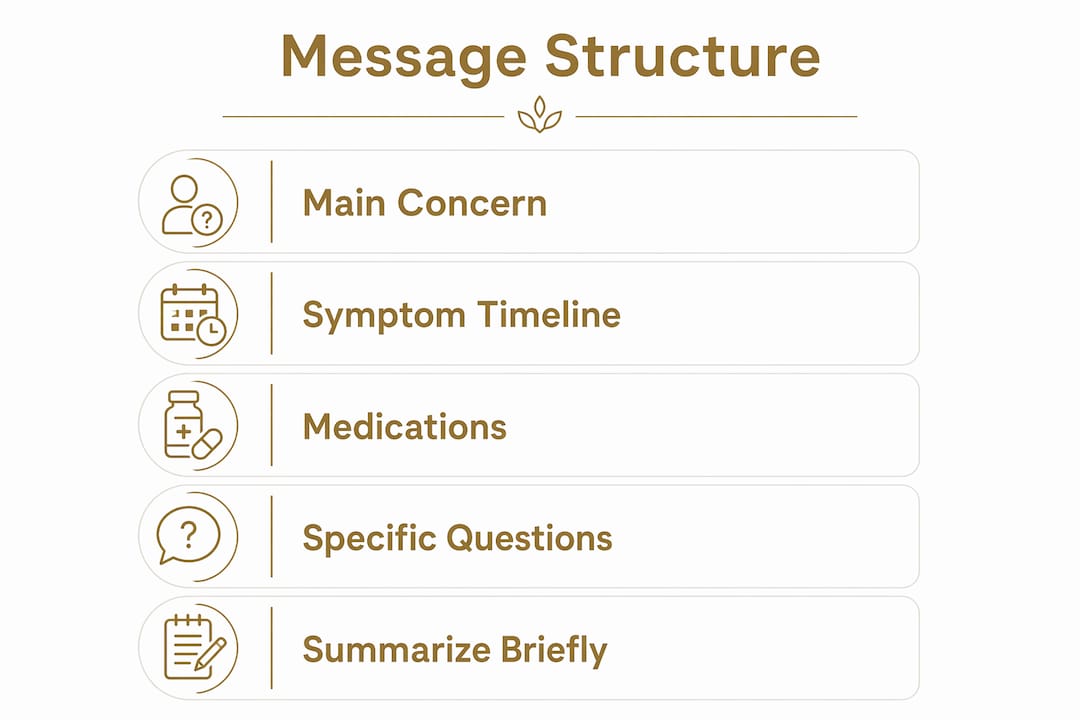
The way you structure a message determines how quickly a clinician can triage and act on it. Smart messaging tools using natural language processing now classify high-priority messages with 81% accuracy, cutting clinician reading delays from 22 hours down to 5 hours. That system works because it looks for specific signals: a clear problem statement, a timeline, medication context, and a requested action. When your message contains those elements, it gets flagged and routed faster regardless of whether AI or a human reads it first.
Here is the structure that mirrors clinical triage logic:
- State your main concern in the first sentence. “I have had a sharp pain in my lower right abdomen for 48 hours” is a triage signal. “I wanted to reach out about something that has been bothering me” is not.
- Describe symptoms with a timeline. When did it start? Is it getting worse, better, or staying the same? What makes it worse or better?
- List your current medications and doses. Include supplements and over-the-counter drugs. Drug interactions are a real clinical concern, and your provider needs the full picture.
- State exactly what you want. A prescription refill, a lab order, a referral, or a follow-up appointment. Providers respond faster when the requested action is explicit.
- Use plain language. Skip the medical terminology unless you are certain it is accurate. Incorrect self-diagnosis in clinical language creates more confusion than plain description.
- End with a confirmation request. Ask the provider to summarize the plan before the call ends or in their reply message.
The table below shows the difference between a weak message and a triage-ready one:
| Message element | Weak version | Triage-ready version |
|---|---|---|
| Problem statement | “I haven’t been feeling well” | “I have had nausea and fatigue for 5 days” |
| Timeline | Missing | “Started Monday, worsening since Wednesday” |
| Medications | “I take some pills” | “Metformin 500mg twice daily, vitamin D 2000 IU” |
| Requested action | “Let me know what you think” | “Requesting a lab order for CBC and metabolic panel” |
| Closing confirmation | None | “Please confirm the plan before we end the call” |
Pro Tip: Read your message out loud before sending it. If you cannot say the main concern in one sentence, the message needs editing. Providers prioritize clear messages and respond to them faster.
What communication habits keep telehealth interactions productive?
Sending a well-structured first message is only half the work. The behaviors you practice throughout the interaction determine whether communication stays productive or breaks down into repeated, frustrating exchanges.
Effective telehealth communication is a two-way dialogic loop that combines provider openness, patient engagement, and prompt responses. That means you carry responsibility for keeping the loop moving. When your provider asks a clarifying question, respond within the window they specify. Delayed responses in asynchronous messaging are one of the most common reasons care gets stalled.
Open-ended questions build rapport and get better answers. Instead of asking “Is this medication safe?” try “What should I watch for while taking this medication?” The second version invites a fuller clinical response and signals that you are engaged. Small talk at the start of a video visit, asking how the provider is doing or commenting on something brief, has been shown in telemedicine engagement research to improve the quality of the clinical exchange that follows.
Use every feature your patient portal offers. Screen sharing during a video visit lets you show a rash, a medication label, or a symptom tracker in real time. Chat functions within the portal keep a written record of what was discussed. These features exist specifically to improve communication quality, and most patients never use them.
“The most productive telehealth interactions I have seen are the ones where the patient treats the portal like a clinical tool, not an inbox. They use the chat, they share their screen, they send a follow-up message the same day with one specific unresolved question. That behavior alone cuts the average number of exchanges in half.”
After every visit, read the after-visit summary immediately and send any follow-up messages the same day. Viewing visit summaries promptly and limiting follow-ups to genuinely unresolved points reduces inefficient back-and-forth and keeps your care moving forward.
Common mistakes that slow down telehealth communication
Most communication breakdowns in telehealth come from a short list of repeatable errors. Recognizing them is the first step to fixing them.
- Sending protected health information over unsecured channels. Texting your symptoms to a provider’s personal number or emailing lab results through Gmail violates HIPAA and puts your data at risk. Always use the designated secure portal.
- Overloading messages with irrelevant history. A message that covers three separate health concerns, two years of background, and a list of questions about billing will not get a fast clinical response. One message, one primary concern.
- Skipping preparation before video calls. Patients who have not reviewed their medication list or last visit summary before a call waste the first five minutes of a limited appointment. That time belongs to your health, not to searching for information you already have.
- Ignoring after-visit summaries. The summary is where your provider documents the plan, the prescriptions ordered, and the follow-up timeline. Ignoring it means you are operating on memory instead of record.
- Skipping teach-back confirmation. Teach-back communication, where you paraphrase the plan back to your provider, is a low-risk, high-benefit strategy that prevents misunderstandings and improves adherence. Most patients skip it entirely.
The data on patient-centered communication in telehealth is clear: fewer than half of patients report optimal communication quality. The patients who do report it are the ones who prepare, structure their messages, and confirm understanding before ending the interaction.
Key takeaways
Messaging a telehealth provider effectively requires secure platforms, a triage-style message structure, and active communication habits that keep the dialogic loop moving.
| Point | Details |
|---|---|
| Use secure platforms only | HIPAA-compliant portals with encryption and audit logs are required for any health information exchange. |
| Structure messages like a clinician | Lead with the main problem, include a timeline, list medications, and state the action you need. |
| Confirm understanding every time | Use teach-back to paraphrase the plan before ending any call or message thread. |
| Respond promptly to async messages | Delayed replies in asynchronous telehealth stall care and reduce provider responsiveness. |
| Read visit summaries immediately | Reviewing the after-visit summary the same day limits unnecessary follow-up exchanges. |
What I have learned from watching patients struggle with telehealth messaging
Most patients approach their first telehealth message the same way they would write a text to a worried family member: emotionally, without structure, and with too much background. I understand why. You are dealing with something that feels urgent and personal. But that approach consistently produces the worst outcomes, and I have seen it play out hundreds of times.
The patients who get the fastest, most useful responses are the ones who treat their provider like a busy professional who needs a clear brief, not a sympathetic ear. That does not mean being cold. It means being specific. “I have had a headache behind my left eye for three days, it is a 6 out of 10, and ibuprofen is not helping. I am currently taking lisinopril 10mg. I want to know if I need imaging” is a message that gets a real answer within hours. A paragraph about how stressful the week has been gets a generic response two days later.
The other thing most guides will not tell you: the telehealth platforms that actually support good communication are the ones with unlimited provider messaging built into the model, not the ones that charge per message or limit your access. When you know you can send a follow-up without it costing you anything, you actually do it. And that follow-up is often where the real clinical value lives. Choosing a provider who offers flexible telehealth access without membership fees changes how you communicate, because you stop rationing your questions.
— Amy
How Revive-meds supports secure, unlimited provider messaging
Revive-meds was built around the communication model this article describes. Every patient gets unlimited provider messaging through a HIPAA-compliant portal, with clinician review before every order ships and no membership fees that would make you think twice before sending a follow-up. The platform integrates consent management, audit logs, and scheduling in one place, so your communication history is always accessible and your care stays coordinated. If you are managing weight, hormones, or metabolic health and want a provider who responds to clear, structured messages with equally clear clinical answers, explore Revive-meds or review the GLP-1 program options to see whether the model fits your needs.
FAQ
What makes telehealth messaging HIPAA-compliant?
HIPAA-compliant telehealth messaging requires encrypted platforms with business associate agreements, access controls, and audit logs. Standard SMS and personal email do not meet these requirements and should never be used to send health information.
How do I get a faster response from my telehealth provider?
Structure your message with the main concern first, a symptom timeline, your current medications and doses, and a specific requested action. Triage-ready messages get routed and answered faster than unstructured ones.
What is teach-back and why does it matter in telehealth?
Teach-back is when you paraphrase your provider’s instructions back to them to confirm you understood correctly. Research shows it improves adherence and reduces repeat queries, making it one of the most effective habits in telehealth communication.
Should I send one message per concern or combine multiple issues?
Send one message per primary concern. Combining multiple health issues in a single message reduces triage clarity and slows provider response. If you have three concerns, send three separate, structured messages or request a longer appointment.
How soon should I read my after-visit summary?
Read your after-visit summary the same day as your visit. Reviewing it promptly lets you send targeted follow-up questions while the clinical details are fresh, which reduces unnecessary back-and-forth and keeps your care plan on track.